Introduction
A GeoReality model is a three-dimensional collection of objects called Elements of various categories.
It is viewed either in a flat Web Browser window or immersed in a Virtual Reality (VR) headset.
At the top of the GeoReality window, in the middle, you will see the model title, name and the Tour name and number (if applicable)
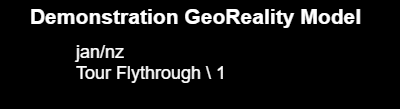
The above shows a Model whose:
- title is "Demonstration GeoReality Model"
- name is jan/nz
- joined Tour is named "Flythrough" and numbered 1 (shorthand Tour ID is "Flythrough \ 1")
At the bottom of the GeoReality window, there is a welcome message that includes your logged-on user ID (if any):

Viewing Modes
GeoReality models are viewed in one of two modes: 3D Mode and Basemap Mode.
In both these viewing modes, you will have access to the menus and data selection operations (as appropriate) but the behaviour of the model and the way you control it differ slightly.
You switch between 3D Mode and Basemap Mode by clicking on the icon in the bottom right of the window:


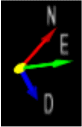
NB There is always a North/East/Down directional pointer in the bottom left of the model visible to help you orientate yourself when moving around: